
Phone Cleaner · AI Clean Storage, recently renamed to Cleaner Neat: Clean Up Storage, is a highly ranked phone cleaner app with a big set of great features. But with a short trial and a steep subscription price, how do you know if you’re getting your money’s worth?
In this Phone Cleaner app review, we’ll help you answer that question. We downloaded and extensively tested Phone Cleaner/Cleaner Neat ourselves, and this article talks about our full experience with the app, its features, pricing options, pros, cons, and much more.
Table of Contents
Summary
As of this writing, Phone Cleaner · AI Clean Storage has been recently renamed to Cleaner Neat: Clean Up Storage, and we’ll mostly be referring to it by its new name. Cleaner Neat, formerly Phone Cleaner, was developed by a company called Smart Tool Studio.
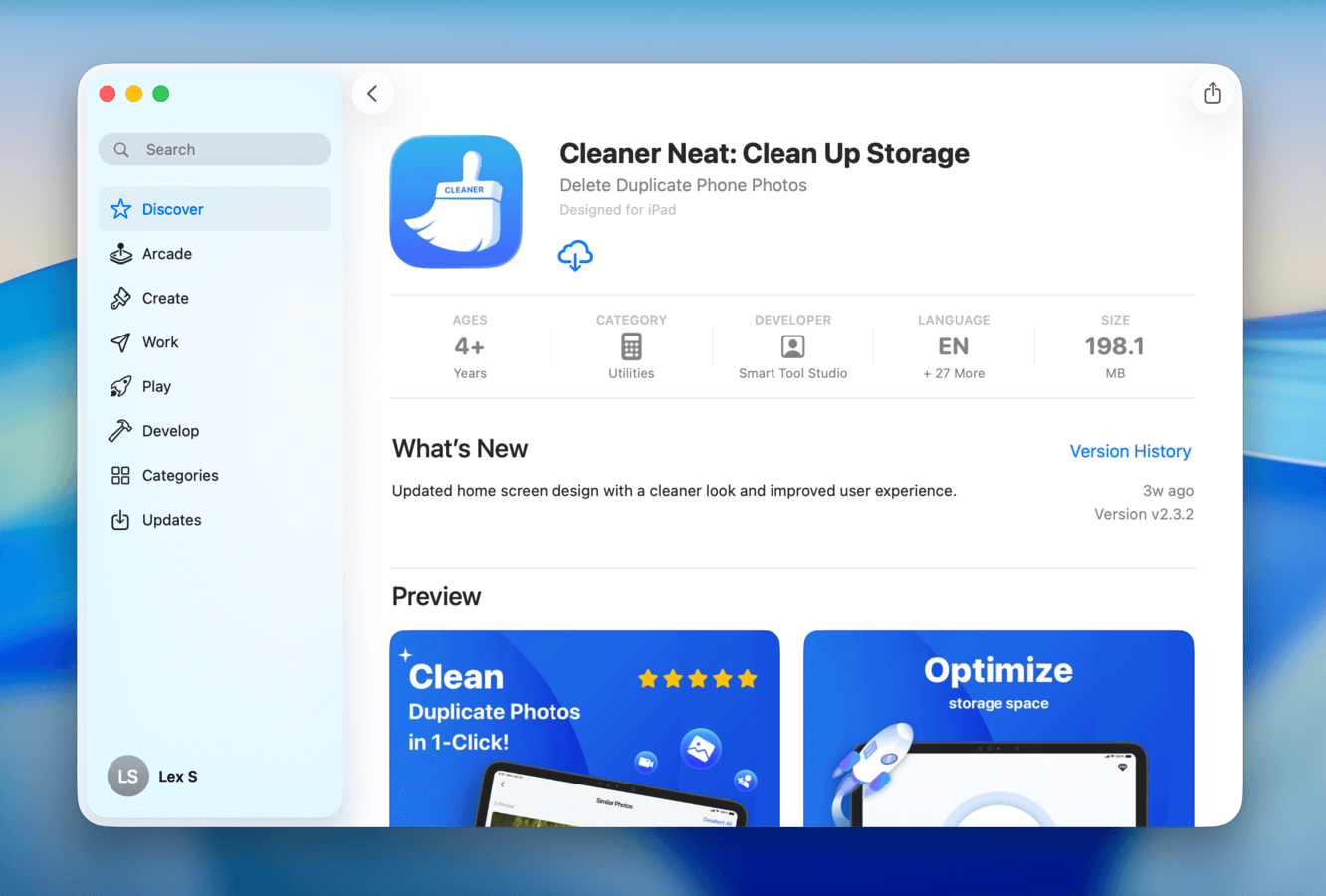
Smart Tool Studio is a Thailand-based team that creates applications for both iOS and Android devices; some of Smart Tool Studio’s other App Store entries include utilities like a PDF Scanner App, Fax from iPhone, and Repost Photos for Insta, and even a home design and puzzle game.
Cleaner Neat is one of the developer’s most popular App Store apps, and it’s capable of helping you clean up your photos, videos, and contacts.
How Much Does Cleaner Neat: Clean Up Storage Cost?
Cleaner Neat: Clean Up Storage’s trial and subscription options are as follows:
- 3-day free trial
- Weekly subscription: $7.99
- Yearly subscription: $34.99
- Lifetime subscription: $49.99
Based on having tested and reviewed most of the phone cleaning apps on the App Store, we found Cleaner Neat to be on the expensive side—especially since it lacks a monthly subscription option. Added to that, it offers a short free trial compared to the 7 days offered by many other apps.
That said, it doesn’t have exactly the same kit as everything else, and we definitely think there are some users who would find Cleaner Neat a good fit for their needs; it’s worth viewing the features section (coming up next) before deciding on price point alone.
Main Features
In this section, we’ll go into greater detail about Cleaner Neat: Clean Up Storage’s features. As an all-around cleaning app, it’s not the most comprehensive option—however, it has a few unique tools that can make it extra useful for the right user. Here’s a quick summary of the app’s features, so you can quickly determine if it has what you need:
- Similar photo cleaner: Cleaner Neat finds similar and duplicate photos, Bursts, and Live Photos, and groups them together. The best photos are automatically selected for each group, allowing you to delete unwanted copies without manual review.
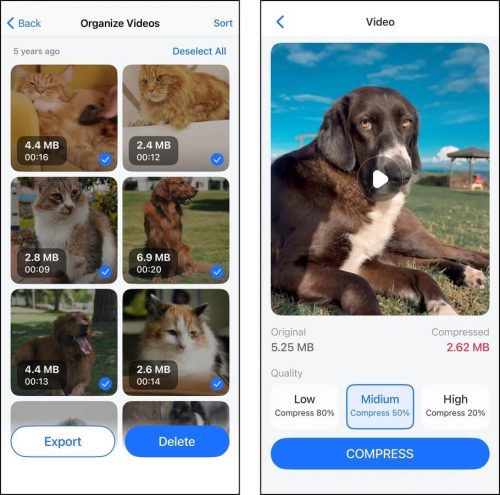
- Video cleaner: The app can also clean up similar videos; if you don’t have any, you can browse your library by year and use the file sizes in the thumbnails to help you prioritize big files.
- Video compressor: Large videos you don’t want to delete can instead be compressed, which shrinks their file size with minimal to moderate impact on visual quality (you can choose between 3 settings).
- AI photo editor: A mini in-app photo editor lets you rotate or crop your photos for social media sites and e-commerce platforms (e.g., Etsy).
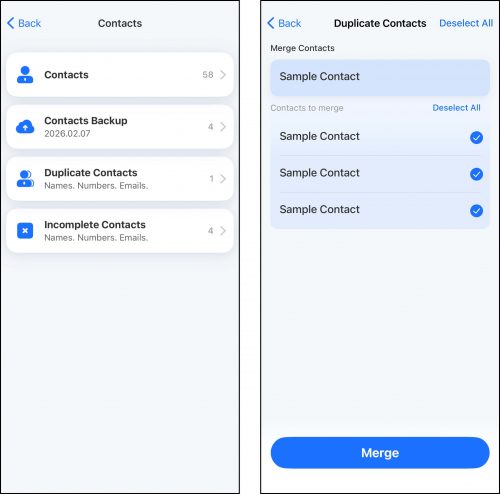
- Contact manager tool: You can access and modify your contacts list from within the app, as well as create a backup of your entire address book. You can also merge duplicate contacts, along with their information, and delete entries with incomplete information.
- Private vault: Sensitive photos and videos can be imported into Cleaner Neat’s private vault, which can be locked with a passcode.
- Cleaning guide: Cleaner Neat provides several cleanup guides for data that it can’t directly access, such as unused apps and browser caches.
- Charging animations: The app also provides several custom charging animations for when your device is plugged into power.
How to Use Cleaner Neat: Clean Up Storage
Below, we prepared a step-by-step guide that not only shows you exactly what you’ll be doing with the app, but also illustrates our own experience using Cleaner Neat: Clean Up Storage to clean up our real data.
Our goal with this section is to give you as much information about Cleaner Neat’s user experience as possible, without requiring you to test it yourself.
Step 1. Download Cleaner Neat: Clean Up Storage from the iOS App Store. If you already downloaded Phone Cleaner · AI Clean Storage once before, Cleaner Neat will appear with the redownload button. Then, grant Full Access to allow the app to interact with your files (don’t worry, it’s safe!).
Step 2. Cleaner Neat’s main menu displays all of its photo and video cleaning features (other tools are accessed from the bottom menu). We always start with cleaning up similar and duplicate photos; this app also compiles similar Live Photos and Bursts—a capability we don’t usually see when reviewing other apps.
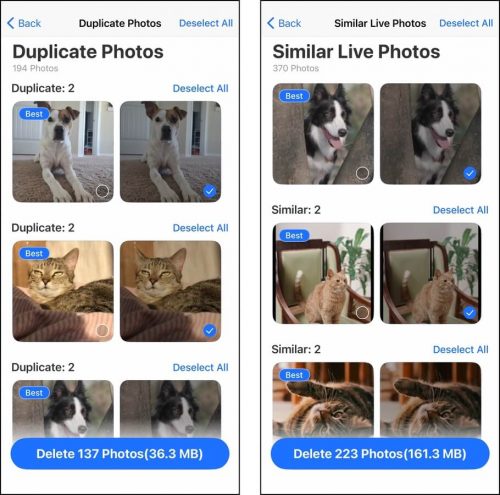
Step 3. Once all duplicate and similar photos are cleaned up, you can proceed to purging your screenshots. Unfortunately, this feature doesn’t have any special sorting or grouping capabilities, but it lets you delete all of your screenshots at once. It saves you the hassle of having to use the Photos app just for this media type.
Step 4. After photo cleanup, our next objective is to manage library videos. The main Clean menu does have a category that stores all of your videos and organizes them by date—but the sorting feature unfortunately doesn’t work as of this writing. Instead, we can proceed with the powerful Compress tool; file sizes on the thumbnail can help you prioritize, and you can select from 3 levels of compression.
Step 5. Next on our checklist is our contacts. Tapping Contacts on the bottom menu navigates to a page of multiple address book-related tools; Duplicate Contacts allows you to merge identical entries, as well as their data, while Incomplete Contacts displays all entries with missing information (so you can delete them). You can also back up your contacts before committing any changes, as well as access and modify your address book from within the app.
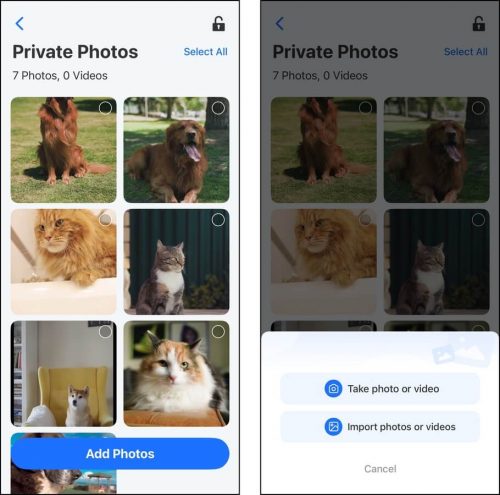
Step 6. We also had a look at the Private Photos tool (Private on the bottom menu). The standout feature in this tool is the ability to take photos and videos directly from the vault, which secures new media by default.
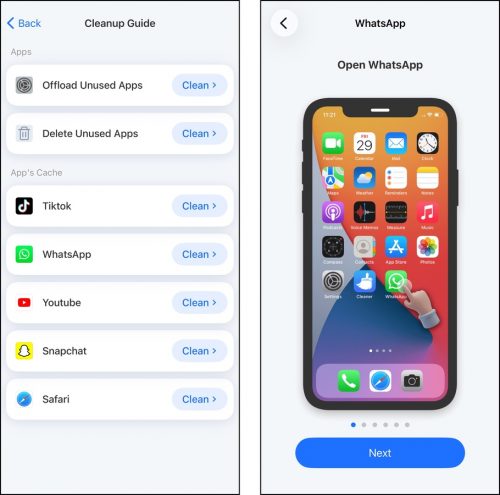
Step 7. Finally, we wanted to cap our efforts by reviewing the Cleanup Guide (tap More on the bottom menu). It was surprisingly thorough; not only did it cover data types users typically don’t think to access or manage, but it also provided easy-to-understand, step-by-step visual guides.
Pros & Cons
There is no “perfect app” for any purpose, but there are applications that are better suited for specific users than others. So for this section, we’ll cover Cleaner Neat: Clean Up Storage’s pros and cons to help you figure out if its strengths are enough for your use case to make up for its weaknesses.
- The user interface is clean and easy to navigate
- Including a photo editor is not common for cleaner apps, but it’s useful
- Similar photo detection in this app has a very good balance of “identical but not quite the same” (other apps have too high a tolerance threshold)
- The in-app cleaning guide can help users who’ve never considered other forms of iPhone cleaning
- Its UI has minor bugs/typos
- The app crashed a few times while we were using it
- The free trial duration is short
- Its weekly subscription is expensive, especially since there’s no monthly option
Is Cleaner Neat: Clean Up Storage Safe to Use?
Yes, Cleaner Neat: Clean Up Storage is completely safe. It utilizes the Recently Deleted folder in the Photos app by default, so any media you delete (intentionally or by accident) is recoverable for at least the next 30 days. It also did not cause any disruptions to iCloud synchronization on our device, even with the Optimize iPhone Storage setting enabled.
Final Assessment
In summary, Cleaner Neat: Clean Up Storage (or Phone Cleaner · AI Clean Storage) is a good tool; it has powerful cleaning features that will get you very far in terms of eliminating clutter from your device and freeing up a lot of space as a bonus.
We also liked the photo editor, even if it’s quite basic, because we can see it being heavily utilized by users who use or work with online social and e-commerce platforms (who also need to clean up their devices).
We also want to highlight the contact cleaning tool—it’s more comprehensive than what we usually encounter, providing not only cleanup capabilities, but also the ability to modify and back up your address book.
However, we do think the app is expensive. Not only is the app’s weekly subscription price already pretty steep, but no monthly subscription option is available. You either have to pay $7.99 per week or invest in an annual or lifetime subscription. And with that kind of price range, we were disappointed to find bugs and performance issues while testing the app–especially considering there are apps like Clever Cleaner that offer a lot of the library cleaning features for free.
Overall, we think this app deserves a spot on your iPhone if you heavily utilize the library cleanup features, the contacts cleaner, and the photo editor altogether. If you don’t need that specific combination of features, there are more affordable options available. On its own, Cleaner Neat is powerful and at least worth a 3-day trial.