
Cleaner Guru is a well-known iPhone cleaning app with thousands of positive reviews on the App Store. But how do you know if the app is right for you?
Like all iPhone apps, Cleaner Guru has its fair share of strengths and weaknesses–and with a very limited free trial, it’s tough to evaluate it fully before you need to pay (especially if you’ve never used iPhone cleaner apps before).
We decided to test the app ourselves and analyze its features, user experience, pros and cons, and price offerings, so we could provide you with all the information you need without having to download it yourself.
Table of Contents
Summary
The Cleaner Guru app is an all-in-one iPhone cleaner from the developer GM UniverseApps Limited. It can help you free up significant storage space on your iPhone by providing cleanup tools for your user data. Specifically, it can eliminate clutter related to your photos, videos, contacts, and even email (e.g., old newsletter subscriptions).
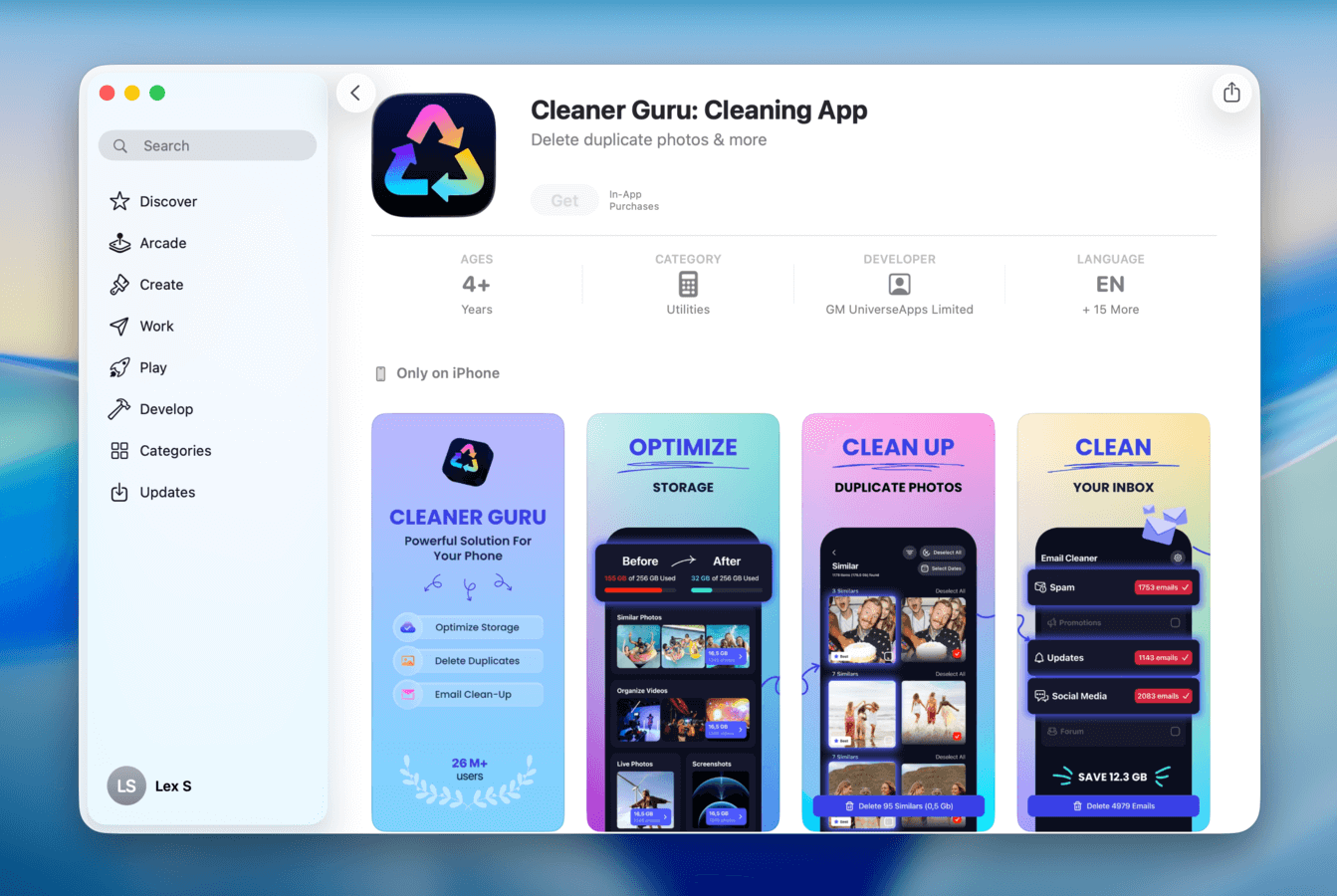
In other words, Cleaner Guru wants to be the only cleaning app on your device. Based on our experience with it—we see the potential. However, we also found possible areas of improvement, which we’ll discuss further in the article.
How Much Does Cleaner Guru Cost?
Here’s everything you need to know about Cleaner Guru’s subscription options upfront:
- 7-day free trial
- $7.99 per week
- $39.99 per year
We’ve analyzed and reviewed a lot of iPhone cleaners on this site, and based on the numbers, we have to consider Cleaner Guru firmly on the pricier side of the spectrum. The $39.99 annual subscription cost is already on the higher side (but not the highest), but we’re mostly concerned about the weekly subscription–$7.99 (and even lower) is what other apps with similar features use for monthly subscriptions.
That said, the 7-day free trial is very good–you get unlimited access to its features without getting bothered by ads, which is a good amount of time to make a decision (other apps only offer a 3-day free trial). As we’ll soon discuss in greater detail in this review, Cleaner Guru is definitely not a bad app by any means, and we can see it being worth the cost for certain users.
Main Features
In this section, we briefly cover Clever Guru’s features to give you an idea of exactly what the app has to offer. While building out this list and testing each feature on our own device, we found the app well-suited for users who need to clean up different types of data.
Here’s a breakdown:
- Similar photo cleanup: Cleaner Guru’s detection algorithm can identify both exact duplicates and similar photos—even if there are visible differences in the content. Then, it automatically suggests the best shot for you and marks the rest for deletion. You can also select a specific time range that you want to review, which can help with finding duplicate and similar photos by context.
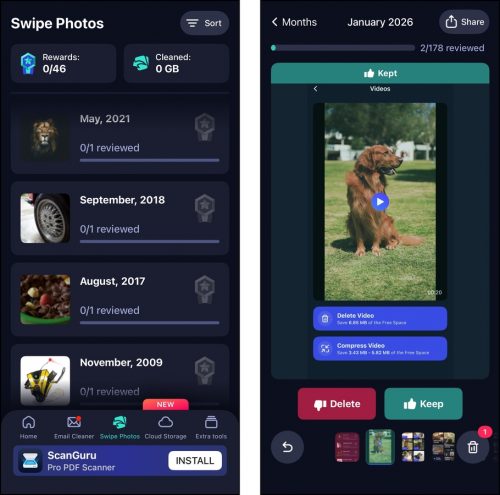
- Swipe gestures: A feature called Swipe Photos sorts your entire library into months, which you can then access to view each month’s photos as a slideshow. As each photo appears, you can use the left and right swipe gestures to delete or keep it. Swipe Photos’ main menu shows you your cleanup progress via a counter at the top of the page.
- Screenshot cleaner: The screenshot cleaning tool compiled all of your screenshots, lets you filter what’s shown based on a custom date range, and sorts them from newest or oldest first. In other aspects, it mirrors the Screenshots album in the native Photos app, so you at least won’t have to jump between apps to clean all your media.
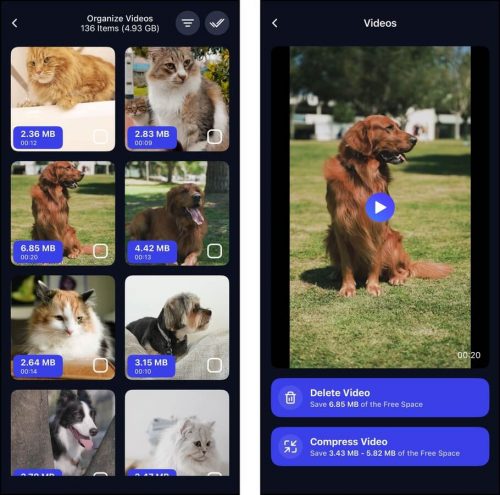
- Video cleaner & compressor: Your library videos are organized by size and can be filtered by date, so you can find videos that you want to delete based on how large they are or when you saved them. Aside from helping you delete videos, Clever Guru can also compress. This shrinks their file size with minimal to moderate impact on image quality.
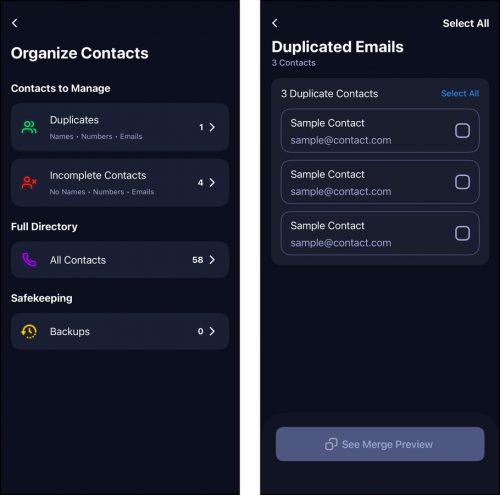
- Contact management: Any incomplete and duplicate contacts in your address book are compiled by the app. Then, you can delete incomplete contacts and merge duplicates (you can preview any merges before committing).
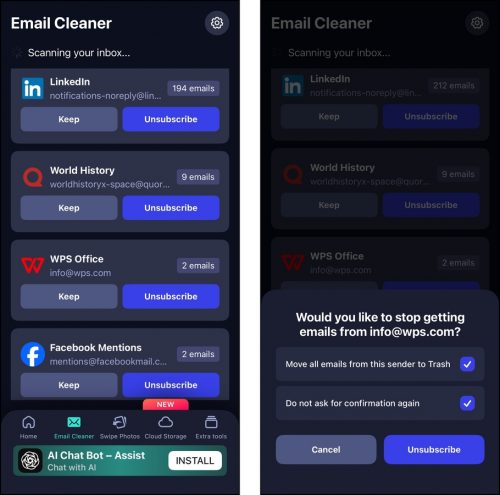
- Email cleaner: Once you connect your email, you’ll be shown all of your subscriptions, like sales and promotion letters, in one place. You can then unsubscribe from each sender and delete all existing associated emails.
- Secret folder: In the app’s Settings menu, you can access a feature called Secret Storage, where you can store sensitive photos and videos and protect them with a password.
- Storage widgets: You can add widgets to your device’s homescreen that can show you your iPhone’s free and used storage, as well as its battery level.
How to Use Cleaner Guru
In this section, we’ll briefly demonstrate how to use Cleaner Guru to clean up your iPhone data. The purpose of this guide is to show you exactly what to expect in terms of user experience and provide step-by-step instructions on how to maximize Cleaner Guru’s many features (since they’re honestly all over the place).
Step 1. Download Cleaner Guru from the App Store. Open the app, sign up for the trial (you have to in order to proceed), and grant it Full Access to your photo library and list of contacts.
Step 2. In the Home menu, select what type of data you want to clean up first. We recommend starting with the Similar Photos section, where Cleaner Guru automatically compiles all duplicate and similar photos in your library. The best copy from each set is already chosen for you, while the rest are marked for deletion. You’ll encounter similar menus in the Live Photos and Screenshots sections.
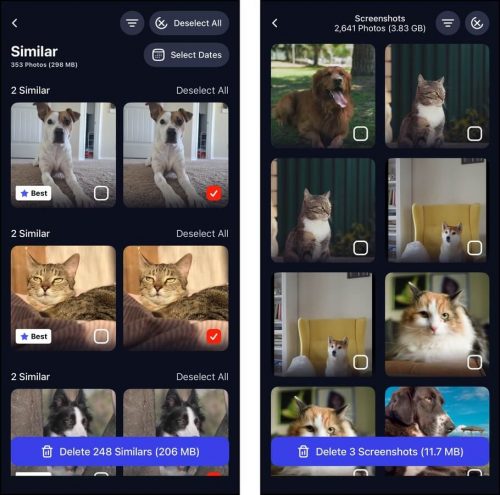
Step 3. Next, we recommend reviewing the Organize Videos section. All your library videos are organized by size, but you can also specify the date ranges of the videos you want to review. You can select and delete them in the thumbnail section, but opening individual videos gives you access to the compression tool.
Step 4. Once you’re done deleting similar photos and managing your video clutter, you can do a deeper clean of your library using the Swipe Photos tool (which you can find in the bottom menu). This tool displays your library’s contents one by one, then lets you swipe left to send it to the trash or swipe right to keep it.
Step 5. After decluttering your media, we recommend cleaning your emails next. Mail attachments and even message content can eventually take up a lot of space. Tap Email Cleaner in the bottom menu to start connecting your email. Then, tap Unsubscribe beside the sources you want to remove to avoid filling up your inbox even more (you’ll also have the option to delete all mail from that sender after unsubscribing).
Step 6. Finally, return to the Home menu and scroll down to the very bottom and tap Manage Contacts. You can review duplicate contacts that have the same name, number, or email. You can also review incomplete contacts. Cleaner Guru doesn’t provide an automatic selection for contacts, but you can easily select multiple entries using the Select All button in the top right corner.
After deleting your photos and videos using Cleaner Guru, make sure to delete them again from the Recently Deleted folder in your iPhone’s Photos app. Deleted media items will remain there for 30 days, taking up storage space, until you manually delete them again.
Pros & Cons
When writing about an app’s pros and cons, we take into account its user experience, value for money, and its ability to accomplish what the user needs.
After analyzing Cleaner Guru, we found that it performed really well, and it was a proper “all-in-one” suite. However, we couldn’t sing the same praises for its interface and pricing (especially because there are tools that offer some of these features for free).
- There’s an element of gamification—you can get “rewards” for cleaning up your data, which is a fun idea that isn’t explored much by this app category.
- The app’s features provide all the tools needed to deep clean an iPhone (aside from attachments and system data).
- Its similar detection tool is better than most. It tolerates just enough variation to make sense for the scan.
- The interface is aesthetically pleasing, even though UX could use some work.
- The video compression tool frees up a lot of space (without compromising quality much).
- The app is expensive, especially because it only provides weekly and annual subscription types.
- Widgets are the only useful “bonus feature” for storage cleanup. The other features could have been left out.
- Its free trial locks you into activating the subscription. You will need to manually deactivate it if you decide not to pay for it.
Is Cleaner Guru Safe to Use?
Yes! Cleaner Guru is safe to use. Based on our tests, Cleaner Guru has no malware or other types of malicious code embedded in the application package. It also didn’t cause any issues with iCloud synchronization or accidental data loss (Cleaner Guru sends deleted photos and videos to the Recently Deleted folder in the Photos app, where they remain recoverable for 30 days). And based on our tests, Cleaner Guru has no malware or other types of malicious code embedded in the application package.
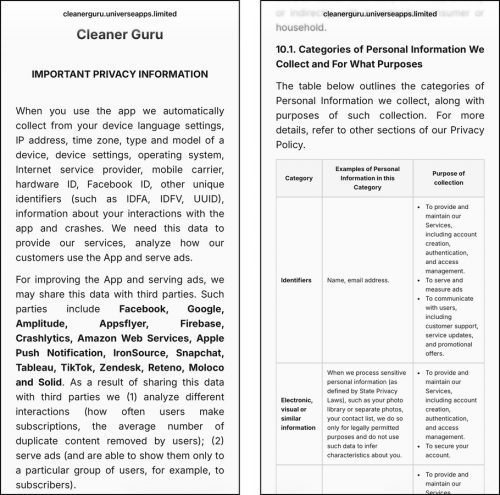
In terms of privacy, do note that DM UniverseApps Limited collects and shares user data, like language settings, IP address, time zone, device model, etc., with third-party companies for advertising purposes. However, the company is explicitly compliant with the GDPR (General Data Protection Regulation).
You can find more information about the type of data Cleaner Guru collects and with whom it’s shared by reviewing the Privacy Policy in the Settings menu of the app.
Final Assessment
Overall, we found that Cleaner Guru mostly lived up to its name as an all-in-one cleaner. It provides coverage for the most high-impact areas, like photos and videos, while also providing tools for less noticeable data footprints, like emails and contacts.
Aside from the wide coverage, we appreciated the depth of the features Cleaner Guru provided. For example, it has an excellent auto-cleanup tool for similar photos (that produces some of the most accurate results we’ve seen)–but the addition of the Swipe Photos features allows for a much deeper clean of the photo library. These tools are usually offered as two separate apps.
Cleaner Guru’s video management tool is also extra useful–being able to delete the biggest videos first (thanks to auto-sorting by file size) and having the option to compress videos can make an immediate and massive difference in your storage space.
This is even reflected in the email cleanup tool as well, which not only unsubscribes you from senders but also gives you an option to delete all their emails. The cleaning tool for contacts is similarly well-rounded, allowing you to either delete or merge contacts (with a merge preview feature).
Based on our experience with the app, we think Cleaner Guru mainly falls short in terms of pricing. The app is generally on the pricier side, especially considering there are free options for some of its features (like Clever Cleaner for your photo library and Easy Cleaner for your contacts). A good start for making Cleaner Guru a more persuasive choice is to add a monthly subscription option as a middle ground between weekly and annual subscriptions (and maybe lower the weekly subscription cost a bit).
Overall, we think that Cleaner Guru is a good app with many useful and well-rounded features, a decent user experience, and we recommend it for users who can make the most of all its features, along with the library cleaner–like the contact management tool, the email cleaner, and the private folder.