Since the beginning of 2026, Apple has not released many public updates for the iPhone. But yesterday, on February 11, Apple finally released the public version of iOS 26.3.
This update does not introduce large interface changes or new core system functions, as major platform changes are expected later with iOS 27, while iOS 26.4 is expected to deliver the updated Siri experience powered by Apple Intelligence. Still, we cannot ignore iOS 26.3, and in this article, we list all the changes it introduces.
New Features in iOS 26.3
As mentioned above, iOS 26.3 does not introduce a long list of major upgrades. Apple focuses on targeted additions and regulatory adjustments rather than large-scale redesigns. Still, several new features deserve attention.
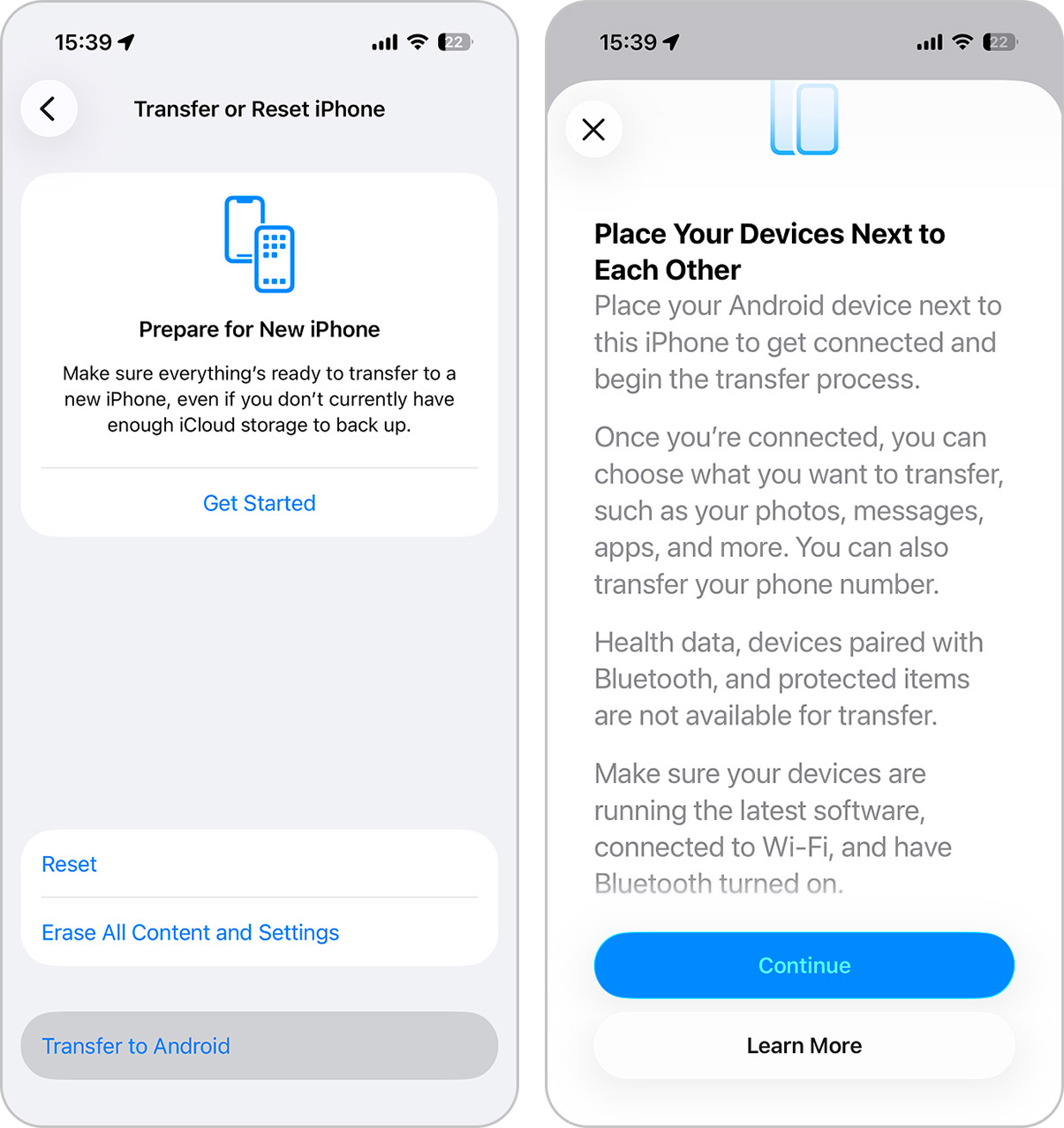
- iOS 26.3 introduces a built-in option that allows you to transfer data directly from an iPhone to a supported Android device. The feature appears in Settings under General > Transfer or Reset iPhone > Transfer to Android. Once both devices are placed close to each other, the system guides users through a wireless migration process. The tool supports the transfer of photos, messages, notes, apps, passwords, phone numbers, and in some cases even eSIM profiles, depending on carrier compatibility. Health data, locked notes, and paired Bluetooth devices remain excluded. This addition removes the need for third-party apps and simplifies the switching process. Apple does not promote migration away from iOS, but it now provides a structured and controlled method for users who decide to move.
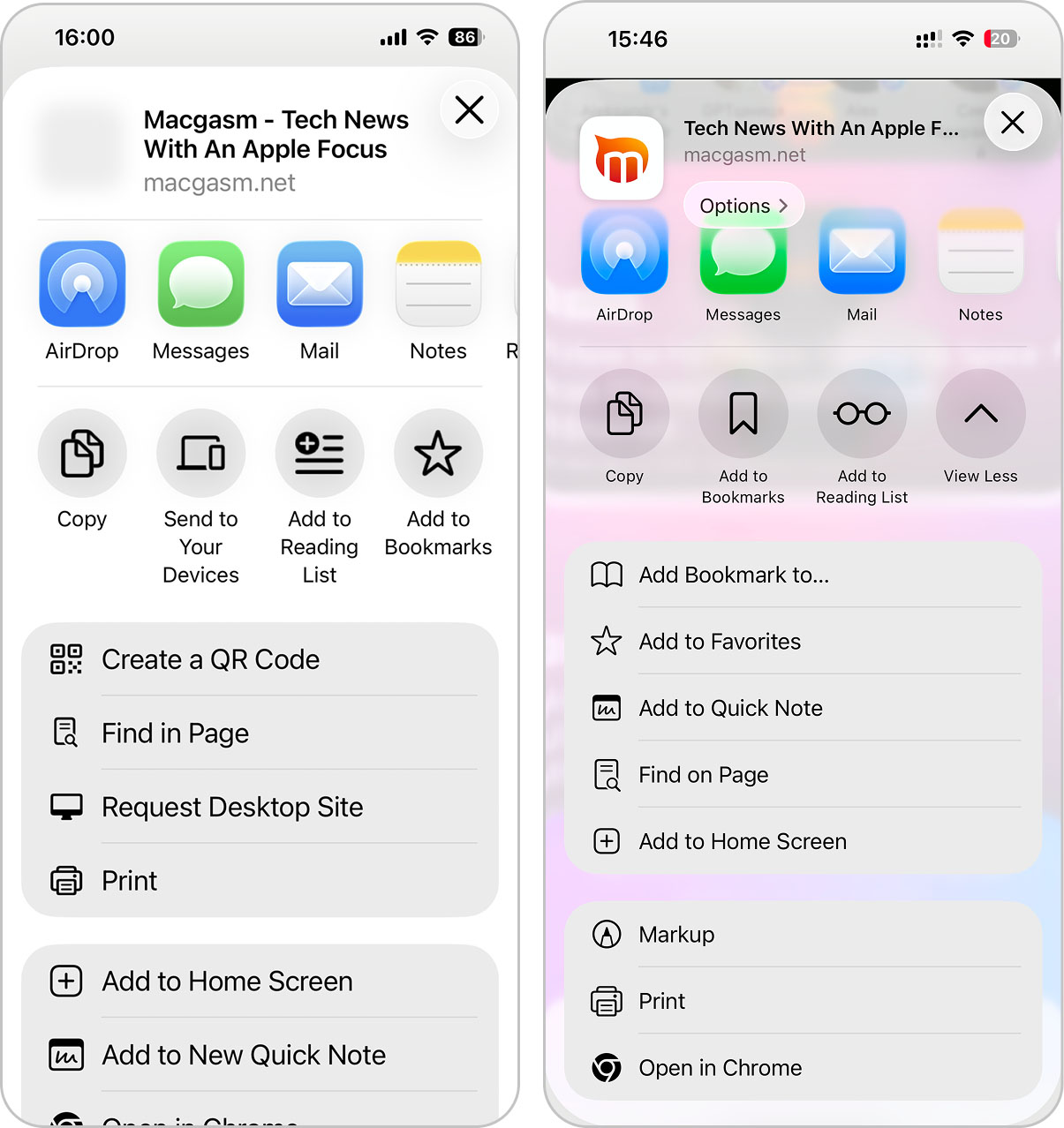
- iOS 26.3 also updates the Share interface in Safari. When you tap the Share button, the layout now looks different. Most notably, that Add to Favorites no longer appears as a circular shortcut at the top. Apple moved it into the vertical action list below.
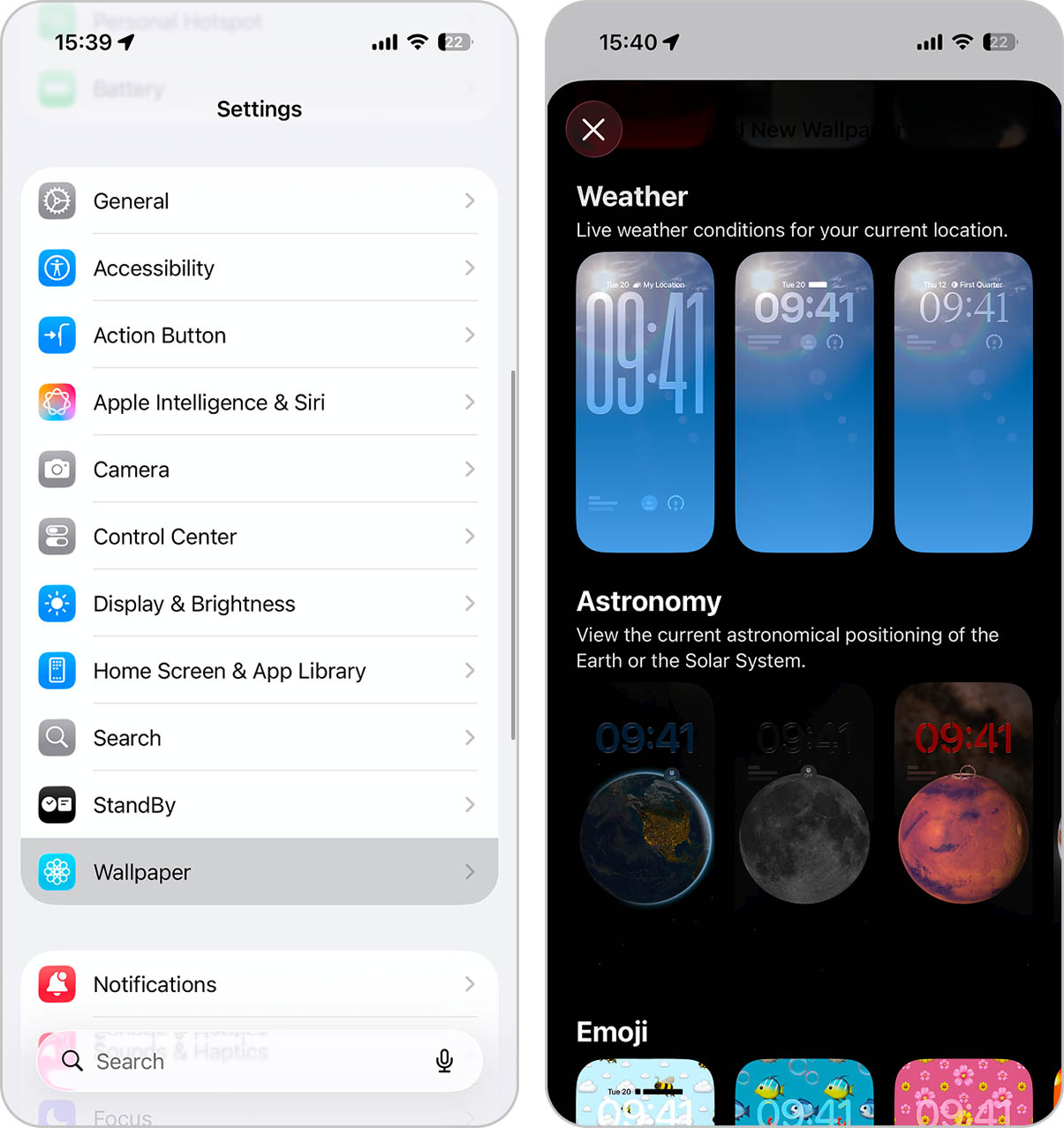
- Apple adjusted the Lock Screen customization interface. The Weather wallpaper category now exists as a separate section instead of sharing space with Astronomy. The update also introduces three preset Weather layouts with different typography and widget arrangements.
- Devices equipped with Apple’s C1 and C1X modems (iPhone 16e, iPhone Air, Cellular M5 iPad Pro) gain a new privacy setting called Limit Precise Location. This option restricts the level of location detail that cellular carriers can determine through network triangulation. When enabled, carriers receive approximate location data rather than precise coordinates. The feature appears under Cellular settings and requires compatible hardware. It does not affect emergency service accuracy. Instead, it limits what carriers can infer about user location in everyday scenarios.
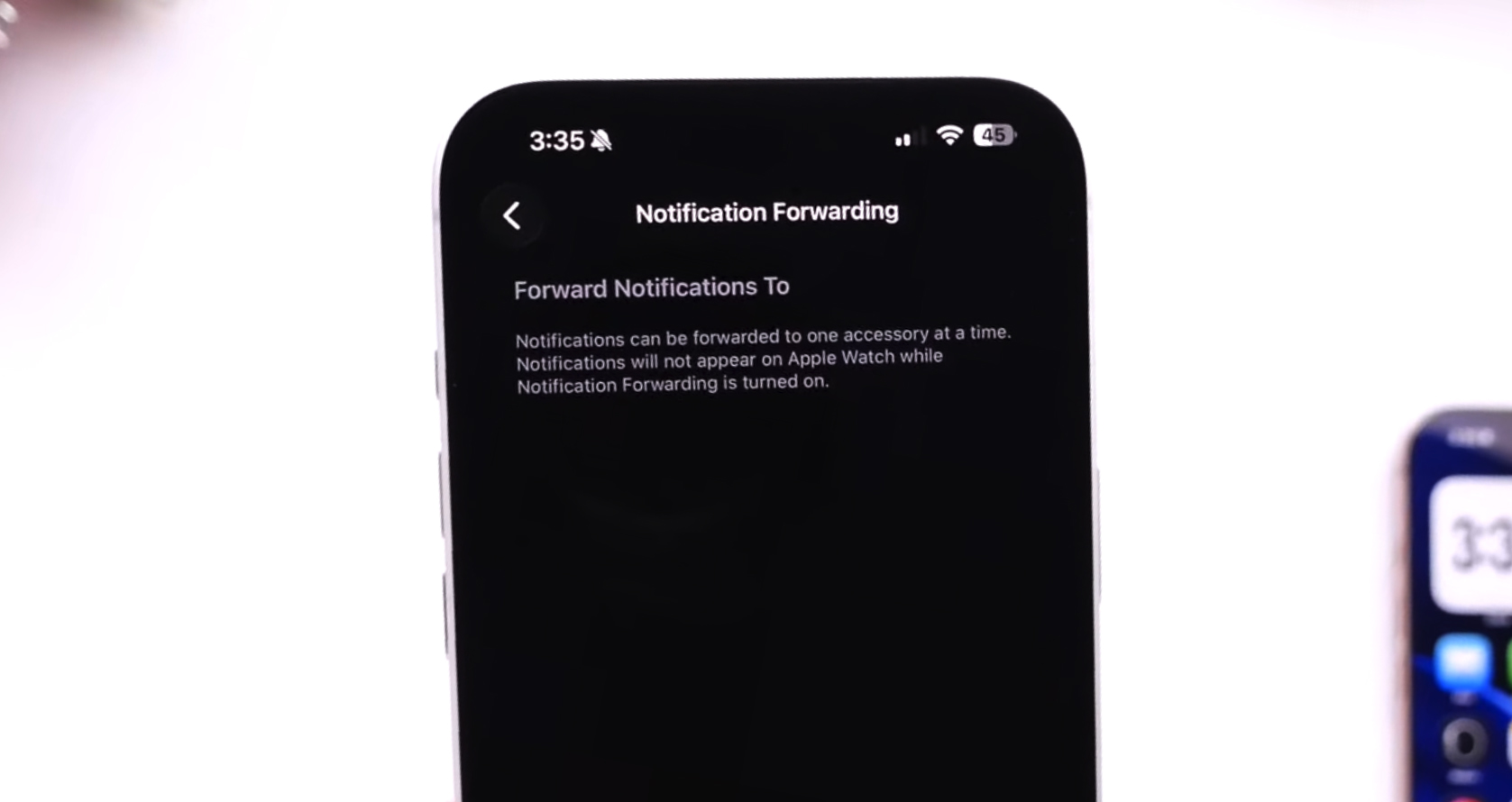
- In the European Union, iOS 26.3 introduces notification forwarding for third-party wearable devices. Users can configure their iPhone to send incoming notifications to compatible non-Apple smartwatches and similar accessories. The feature reflects compliance with EU regulatory requirements that address interoperability between platforms and outside the EU, this functionality remains unavailable.
Source: YouTube video by iDeviceHelp - EU users also gain access to proximity-based pairing for third-party accessories. Compatible headphones and wearables can now trigger a pairing prompt when placed near an iPhone or iPad, similar to the AirPods experience. Previously, this seamless setup method applied only to Apple hardware.
- Although Apple does not officially highlight it in release notes, iOS 26.3 includes system-level preparation for end-to-end encrypted RCS messaging. Code changes indicate that the platform can support encrypted RCS conversations once carriers enable the required infrastructure. At present, encryption does not activate automatically.
Security and Bug Fixes in iOS 26.3
iOS 26.3 does not bring a long list of flashy features, but it delivers a large set of patches across core parts of the system. If you like your iPhone secure, stable, and boring in the best way, this section is the real update:
- Apple highlights one vulnerability as especially serious. The issue affects dyld, the dynamic linker. Apple states that an attacker with the right capability could execute arbitrary code, and the company confirms that this flaw was used in an extremely sophisticated attack against specific targeted individuals on versions of iOS prior to iOS 26.
- Beyond that, iOS 26.3 closes several privacy and boundary-related gaps. Apple fixes a Photos issue that could allow access to images from the Lock Screen under certain conditions. It also patches multiple Accessibility components where physical access to a locked device could expose sensitive data.
- The update addresses sandbox and permission weaknesses in Messages, Shortcuts, Spotlight, and related system areas, which help prevent apps from accessing data outside their allowed scope.
- Network and media handling also receive attention. Apple resolves issues in Bluetooth, Wi-Fi, and the Kernel, along with flaws in CoreAudio, CoreMedia, and ImageIO that could allow specially crafted files to crash apps or expose memory.
Final Thoughts
We cover the main changes introduced in iOS 26.3. We are quite satisfied with this release. It includes practical additions (the built-in option to transfer data to Android ) and, more importantly, a long list of security fixes across core system components. Even if you never plan to switch platforms, the security improvements alone make this update important.
Should you update your iPhone to iOS 26.3? If you are interested in our opinion, then yes, primarily because of the security patches. Apple confirmed that at least one vulnerability was actively exploited in previous versions of iOS. That is not something to postpone. To install the update, open Settings > General > Software Update, then follow the on-screen instructions.
But the update package is large. The installation file reaches around 10 GB, depending on your device and current version. So, before you proceed, check your available storage to make sure you have enough free space. If storage runs low, we recommend reviewing our guide on how to clear storage space on your iPhone before starting the update.